Setup Sonar for Code Analysis
I am a BIG promoter of Code Quality. Maintaining code to be at the hightest quality at all times is very crucial.
There are many ways to achieve this, however one of the simplest things we can do is running code analysis for every push to a branch.
Sonar is one of the most widely used tools whenever we talk about code analysis. So, I used the same for my app as well.
It needs few steps to setup since I want it to be part of my Continuous Integration.
- Installed SonarQube Scanner plugin in Jenkins instance. I am using the cloud instance of Sonar. So it is
"https://sonarcloud.io/" - I logged into my SonarCloud using Github and created a new Organization and Project for my application. Created a token by going to “My Account -> Security -> Generate Token” which is needed for authentication.
3. In the Plugin configuration provided Sonar URL i.e "https://sonarcloud.io/" Token created in previous step. Token has to be added as SecretText in Jenkins Credentials.
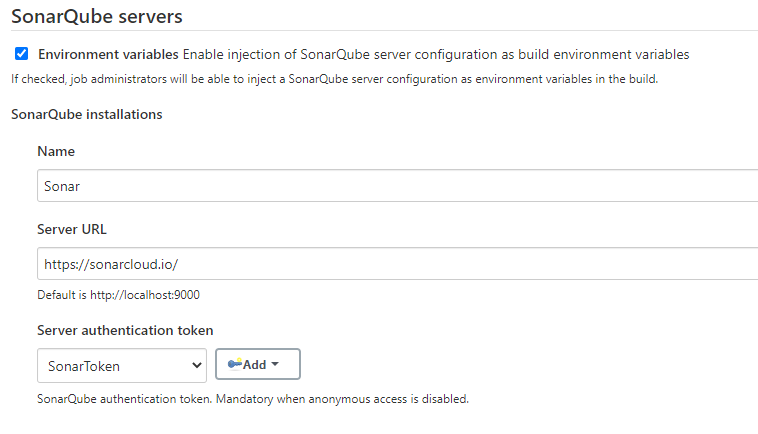
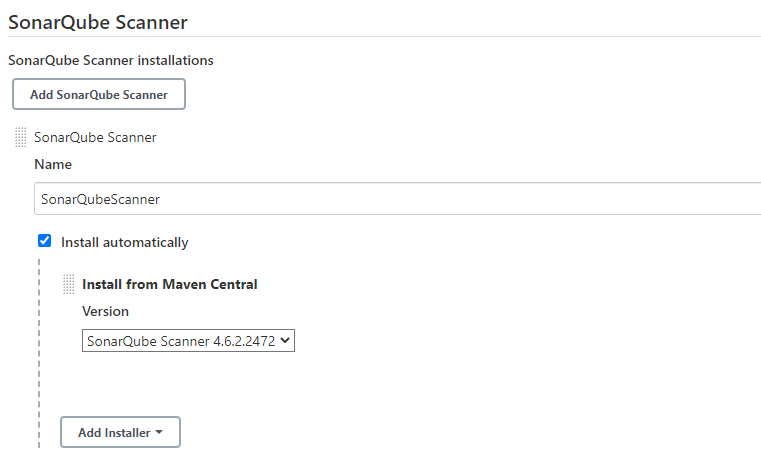
4. Under Global Tool Configuration of Jenkins, we need to select SonarQube Scanner.
5. And at last add a stage in Jenkins pipeline to call scanner to analyse application

Project key can be retrieved by navigating to “[ProjectName] -> Administration -> Update Key” from Sonar Homepage
Organization can be retrieved by clicking on Profile Pic on top right in Sonar homepage, click on Organization Name in the list. In the new screen Organization is visible next to “Key: [Organization]”
After all this, my Jenkins pipeline threw error when it executed my Code Analysis step that Automatic Code Analysis is enabled on Sonar. So I had to explicitly disable this setting as I am running code analysis via my CI and I do not want to run code analysis whenever there is a push on my branch. So I had to disable it like below.

But if I do not use it as part of CI, I can have it enabled.
Now, whenever I push my changes to my branch, Sonar is doing code analysis. So, one small step towards Code Quality achived. Many more to go.
First published on my old blog, Write Code. Be Agile. Go DevOps.